


As a rental property owner, timely maintenance decisions play a major role in protecting your investment and keeping tenants satisfied. When repairs exceed preset authorization limits, estimates are sent to owners for review and approval through the owner portal.
For property owners in Greenville NC, Goldsboro NC, and throughout Eastern North Carolina, understanding how to review and approve estimates quickly helps avoid delays, extended maintenance issues, and tenant frustration.
What Is the Estimates Tab in the Owner Portal?
The Estimates tab in your owner portal is where all maintenance estimates sent by your property management company are stored. This section allows you to easily track the status of maintenance work that requires owner approval.
Within the Estimates tab, you can view:
• Pending estimates awaiting your approval
• Previously approved estimates
• Estimates that have been rejected
This centralized view helps owners stay informed and manage maintenance decisions efficiently.
How to Review an Estimate
To review an estimate, click into the estimate listed under the pending section of the Estimates tab. This will open the full estimate details.
The Estimates tab will show you all estimates for work orders that have been sent by your property management company. Here you can view all pending estimates that are awaiting approval, all approved estimates previously submitted, and any estimates that have been rejected.
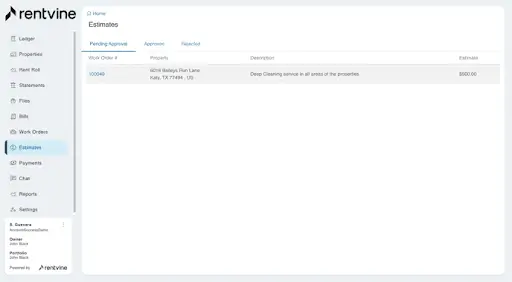
You can click into an estimate to view more information regarding it. From this page you will be able to accept the estimate or reject it. You can also view any associated files by clicking the files tab on this page.
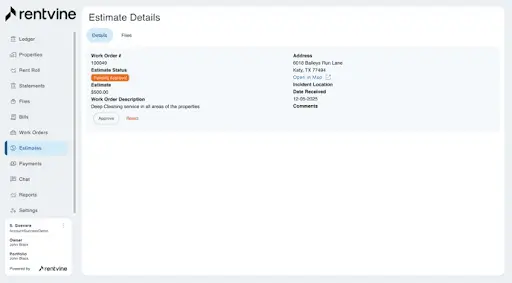
From this page, you can:
• Review the scope of work being proposed
• See the estimated cost of repairs
• View who the vendor is
• Check the status of the work order
If there are any documents, photos, or invoices attached, you can view them by clicking the Files tab within the estimate.
These files often include photos of the issue, written explanations from the vendor, or additional documentation to help you make an informed decision.
How to Approve or Reject an Estimate
Once you’ve reviewed the estimate details, you’ll have the option to either accept or reject the estimate directly within the portal.
Approving the estimate allows the property management team to move forward with the repair immediately. This helps prevent further damage to the property and minimizes disruption for the tenant.
Rejecting an estimate pauses the process. If you reject an estimate, it’s important to communicate any questions or concerns so the team can follow up with additional information, alternative options, or revised pricing if appropriate.
Why Timely Approval Matters for Property Owners
Delays in approving estimates can slow down necessary repairs, which may lead to:
• Increased repair costs
• Tenant dissatisfaction
• Extended maintenance issues
• Potential property damage
For rental property owners working with a professional property management company in Greenville NC or Goldsboro NC, prompt estimate approvals help keep maintenance moving efficiently and protect the long-term condition of the home.
How Approved Estimates Appear on Your Owner Statement
Once an estimate is approved and the work is completed, the expense will appear clearly on your owner statement in the summary. This allows you to track maintenance costs and see exactly how funds were applied.
If you’d like a refresher on how maintenance expenses show on your statement, you can review our guide here:
Internal link suggestion: Your Owner Statement Explained blog
Maintenance Transparency for Property Owners
The owner portal is designed to give you full visibility into maintenance activity, estimates, and expenses. Reviewing and approving estimates online keeps communication clear and ensures repairs are handled promptly and professionally.
For property owners in Eastern North Carolina, this process helps protect your investment, maintain tenant satisfaction, and avoid unnecessary delays.
If you ever have questions about an estimate, need clarification on the scope of work, or aren’t sure how to approve an estimate in your portal, the team at Flagship Realty Group is always here to help.
Summarize this content with AI:
Chat GPTGrok
Perplexity
Claude.ai